City of Johannesburg e-Services 2026 | Step by Step Guide to Access
This article contains the updated step-by-step guide on how to access and use the City of Johannesburg e-Services in 2026.
How to Register and Log in to City of Johannesburg e-Services
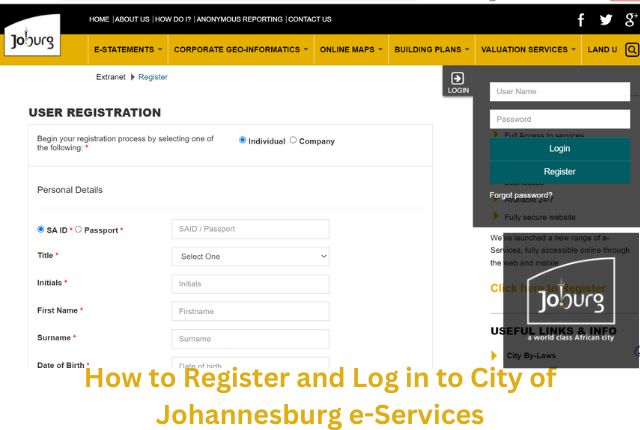
If you do not have an e-Services Username and Password, you will need to register and create your username and password. Individuals can register using their South African ID number or Passport Number. Companies can register with a valid company registration number registered with the CIPC (Companies and Intellectual Property Commission).
Non-Profit Organizations (Trusts, Sectional Titles and Body Corporates) should register as individuals.
Follow these easy steps:
- Step 1: Visit the official City of Johannesburg e-Services portal at https://eservices.joburg.org.za/.
- Step 2: Click on the “Click here to Register” button.
- Step 3: Complete the registration form with your personal details, including your full name, email address, South African ID or Passport Number, and create a secure password.
- Step 4: A confirmation email will be sent to your email address. Click the verification link to activate your account.
After registration, you can log in using the following steps:
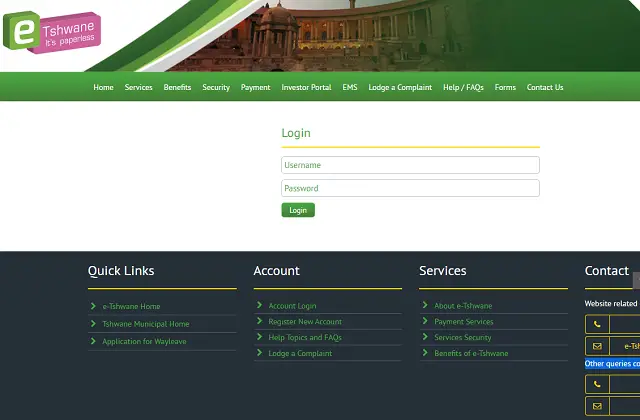
- Go to the official e-Services login page at https://www.e-joburg.org.za/login.
- Enter your registered email address and password.
- Click the “Login” button to access your account dashboard.
The e-Services ecosystem in 2026 also supports:
- Viewing municipal statements and balances.
- Submitting water and electricity meter readings.
- Viewing building plan application progress.
- Accessing GIS and property information services.
- Receiving e-Statements electronically.
- Managing complaints and service requests online.
City of Johannesburg Contact Information
You can contact the City of Johannesburg using the following official support channels for assistance with online services and municipal accounts.
City of Johannesburg contact details:
All City of Johannesburg queries should be channelled through the official Joburg Connect Call Centre:
- 0860 JOBURG or 0860 562 874 (Available 24/7)
- Email: joburgconnect@joburg.org.za
- e-Joburg technical support: 086 099 5150
Additional official support channels include:
- Fraud Hotline: 0800 002 587
- Emergency Connect: (011) 375 5911
City of Johannesburg service centres:
A list of City of Johannesburg customer service centres and payment points can be found on the official municipal website.
| City of Johannesburg Regions & Service Centres |
|---|
| Region A |
| Region B |
| Region C |
| Region D |
| Region E |
| Region F |
| Region G |
Options for Online Payment

Making online bill payments is one of the most widely used features of the City of Johannesburg e-Services platform.
How to make a payment online:
- Log in to your City of Johannesburg e-Services account.
- Navigate to the “Payments” section.
- Select the invoice or municipal account you want to pay.
- Choose your preferred payment method such as EFT, debit card, credit card, or approved third-party payment services.
- Follow the on-screen instructions to complete the transaction.
Important 2026 Notice: Due to ongoing upgrades to the City’s digital infrastructure and payment ecosystem, residents are advised to always verify that payments reflect correctly on their municipal statements after completing transactions online.
The City’s e-Services infrastructure in 2026 continues to undergo modernization and cloud-based system improvements aimed at improving long-term reliability and service delivery.
If you use Internet banking, telephone banking, or ATM banking to pay your municipal account, ensure that your beneficiary details are updated correctly with your bank.
Over-the-counter payments should always be accompanied by your latest municipal statement as payment reference.
If you need assistance setting up the City of Johannesburg as a banking beneficiary, contact your bank directly.
- ABSA Bank: 08600 08600
- Standard Bank: 0860 123 007
- Nedbank: 0860 115 060
- First National Bank: 087 575 0000
International Banking Numbers:
- Standard Bank International: +27 11 299 4620
- Nedbank International: +27 11 710 4332
Pay your account by Debit Order – Complete the form:
- The most convenient payment method for many residents is debit order.
- Debit order forms are available at official City of Johannesburg customer service centres.
- Download the official City of Johannesburg Debit Order Form
Additional Online Services Available in 2026
The City of Johannesburg digital ecosystem has expanded significantly and now includes additional specialized online platforms and mobile services.
- e-Statements Service: https://eservices.joburg.org.za/e-statements
- Construction Permit Management System (CPMS): https://cpms.joburg.org.za/
- Building Plan Progress Tracker: https://eservices.joburg.org.za/pages/BuildingPlanProgress.aspx
- Corporate GIS & Online Maps: https://eservices.joburg.org.za/cgis/
- Mobile Map Viewer: https://ags.joburg.org.za/cgismobi
- City Power Fault Logging: https://citypower.mobi/
- Johannesburg Water: https://www.johannesburgwater.co.za/
Official Mobile App
The City of Johannesburg also provides the CoJ Central Service Delivery (CSD) App for mobile access to municipal services.
- Apple App Store: Download via Apple App Store
- Android Users: Search for “CoJ Central Service Delivery” on Google Play Store.
The app allows residents to:
- Access municipal services online.
- Check application statuses.
- Submit service requests.
- Manage municipal accounts.
- Access digital permits and service information.
Frequently Asked Questions
1. What is the City of Johannesburg?
The City of Johannesburg is the largest metropolitan municipality in South Africa and the economic hub of Gauteng Province.
2. Where is Johannesburg located?
Johannesburg is located in Gauteng Province in the northeastern part of South Africa on the Highveld plateau.
3. How can I log in to City of Johannesburg e-Services?
Visit the official login portal at https://www.e-joburg.org.za/login and enter your registered email address and password.
4. Can I track building plan applications online?
Yes. Residents and professionals can track applications online using the Building Plan Progress Tracker.
5. Does the City of Johannesburg offer online GIS maps?
Yes. The Corporate Geo-Informatics platform provides online GIS and property mapping services.
6. Is there a mobile app for City of Johannesburg services?
Yes. The CoJ Central Service Delivery (CSD) app is available for both Android and iOS users.
Related Articles
- List of Universities in South Africa
- List of TVET Colleges in South Africa
- List of Bursaries in South Africa 2026