
SANC eRegister | www.sanc.co.za | How to Login and Register
This information involves the South African Nursing Council (SANC) eRegister Portal: http://www.sanc.co.za. It also contains the organization’s contact address and the official website. Kindly check below for more details.
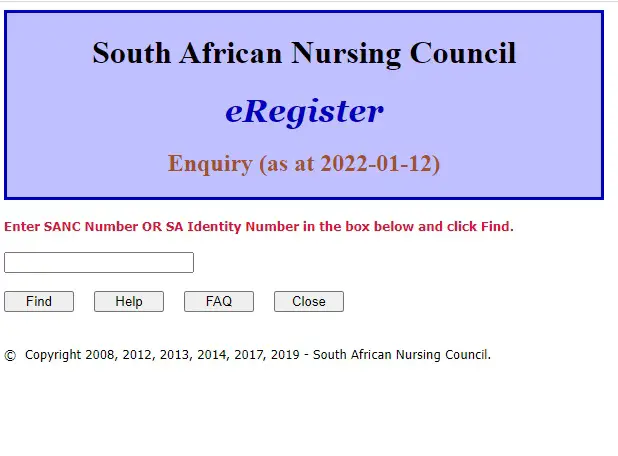
The Authority of the South African Nursing Council (SANC) has enabled the eRegister portal. The eRegister is the South African Nursing Council Electronic Register of Nurses and Midwives. It is primarily intended for use by employers or prospective employers who need to verify the registration status of an employee or prospective Practitioners may also use eRegister to confirm their own registration status.
As you can see, eRegister Portal is essential for applicants of the South African Nursing Council (SANC).
Update: South African Nursing Council (SANC) Fees Structure
SOUTH AFRICAN NURSING COUNCIL (SANC) EREGISTER PORTAL
- South African Nursing Council (SANC) eRegister Portal: https://www.sanc.co.za/eRegister.aspx
- South African Nursing Council (SANC) Website: http://www.sanc.co.za/
HOW TO ACCESS THE SOUTH AFRICAN NURSING COUNCIL (SANC) EREGISTER PORTAL
South African Nursing Council (SANC) Online eRegister guide
INFORMATION YOU NEED TO HAVE READY THAT WILL ASSIST YOU WITH YOUR SANC EREGISTER ACCESS
- eRegister freely available to use on the SANC website, via the internet.
- There are instructions on the screen to guide the end users and make the use of the tool user friendly
- Conditions of use (explained below) must be read and accepted in order to use the eRegister.
Detailed instructions on how to access the South African Nursing Council (SANC) eRegister Portal are as follows:
- Go to sanc.co.za
- Using any of the mainstream internet browsers (Internet Explorer, Edge, Chrome, Firefox, etc.)
- On the left pane, click on “eRegister”
- Click on “Click here to start the eRegister System”
- Click on “I accept the conditions of use”
- Enter the SANC number or an SA ID number and click the Find button
Read Also:
- Department of Home Affairs Latest Jobs and Recruitment >>>
- Sappi Latest Jobs and Recruitment >>>
- GPG Professional Job Centre Latest Jobs and Recruitment >>>
- FNB Latest Jobs and Recruitment >>>
- SITA Latest Jobs and Recruitment >>>
- Motus Latest Jobs and Recruitment >>>
- UNIVEN Latest Jobs and Recruitment >>>
- Unisa Latest Jobs and Recruitment >>>
- DPSA Latest Jobs and Recruitment >>>
- RTMC Latest Jobs and Recruitment >>>
- Rand Water Latest Jobs and Recruitment >>>
- NPA Latest Jobs and Recruitment >>>
- SANBS Latest Jobs and Recruitment >>>
- Free State Education Latest Jobs and Recruitment >>>
- Eastern Cape Education Latest Jobs and Recruitment >>>
- Department of Education Latest Jobs and Recruitment >>>
- Department of Home Affairs Latest Jobs and Recruitment >>>
- Ekurhuleni Municipality Latest Jobs and Recruitment >>>
Don’t miss out on current updates, kindly like us on Facebook & follow us on Follow @Eafinder OR leave a comment below for further inquiries.

I need my sanc receipt my number is 16248981
Hi Livhuwani,
Unfortunately, we are not able to retrieve SANC receipts on your behalf as we are not affiliated with SANC. To get your receipt, please log in to the SANC eRegister portal at https://eregister.sanc.co.za/ using your ID number and password. If you are unable to log in, contact SANC directly at 012 420 1000 or email registrar@sanc.co.za for assistance.
We hope this helps!
I need my SANC receipt
14616825
Hi Tebogo,
We are not affiliated with SANC and cannot retrieve receipts on your behalf. To get your SANC receipt, please log in to the SANC eRegister portal at https://eregister.sanc.co.za/ using your credentials. If you are having trouble logging in, contact SANC directly at 012 420 1000 or email registrar@sanc.co.za.
We hope you get it sorted!