
HTI Portal 2026 | healthtraining.gov.gh
This article contains information on the Health Training Institutions (HTI) Admission Portal for the 2026/2027 academic year. It covers how to access the portal, purchase your application voucher, complete your application, and track your admission status. The HTI portal is managed by the Ministry of Health (MOH) of Ghana and is the only official gateway for admissions into public nursing, midwifery, and allied health training colleges in Ghana.
The Ministry of Health (MOH) Ghana has officially opened admissions for the 2026/2027 academic year into public health training institutions, including nursing, midwifery, and allied health programs. The application process is conducted entirely online through two official government portals. Do not apply through any third-party website or unofficial link.
The two official portals are:
- Ghana.GOV Voucher Purchase Portal — where you pay for your application form and receive your PIN and Serial Number: https://www.ghana.gov.gh/mdas/ba922bb2c4/apply/
- HTI Admission Portal — where you log in with your PIN and Serial Number to complete and submit your application: https://register.healthtraining.gov.gh/portal/login
HOW TO ACCESS THE HEALTH TRAINING INSTITUTION (HTI) PORTAL TO LOGIN OR REGISTER
The application process follows four official steps as prescribed by the Ministry of Health. Complete each step in order.
Step 1: Purchase Your Application Voucher
- Open a modern web browser such as Google Chrome, Mozilla Firefox, or Microsoft Edge. Internet Explorer is no longer supported.
- Go to the official Ghana.GOV HTI voucher purchase page: https://www.ghana.gov.gh/mdas/ba922bb2c4/apply/
- Complete the payment for your application form through this state-managed platform.
- Upon successful payment, the system will generate a unique PIN and Serial Number. Save these carefully — they are your only way to access the HTI application portal. Do not share them with anyone.
Step 2: Log In to the HTI Admission Portal
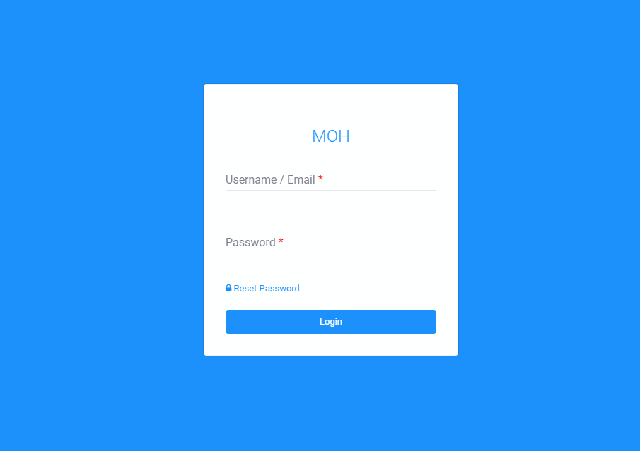
- Go to the official HTI Admission Portal login page: https://register.healthtraining.gov.gh/portal/login
- Enter the PIN and Serial Number generated from the Ghana.GOV voucher purchase.
- Click Sign In to access your personalized application dashboard.
Step 3: Complete Your Application Form
- Once logged in, your dashboard will display the online application form.
- Fill in all required sections accurately — personal details, academic history, and your preferred institutions and programs.
- Upload all required supporting documents (e.g., WASSCE results slip, birth certificate, national ID) as specified in the official “Instructions for Application” guide published by the MOH.
- You can save your progress and return to complete the form later before final submission.
Step 4: Submit and Track Your Application
- Once you have filled in all sections and uploaded all required documents, review your entries carefully.
- Submit your application from the dashboard. You will receive a confirmation notification upon successful submission.
- After submission, log back into your dashboard regularly at https://register.healthtraining.gov.gh/portal/login to track your application status (e.g., “Application Received,” “Document Verification,” “Shortlisted,” “Admitted,” or “Not Admitted”).
Forgotten your Password?
- On the HTI Portal login page at https://register.healthtraining.gov.gh/portal/login, click the “Forgot Password?” link.
- Enter the email address you used when setting up your account. A password reset link will be sent to that email address.
- Check your spam or junk folder if the email does not arrive in your inbox.
- If you cannot remember the email address used, contact the MOH through the official support channels listed below.
HEALTH TRAINING INSTITUTION (HTI) LOGIN PORTAL
- HTI Admission Portal (Login / Application): https://register.healthtraining.gov.gh/portal/login
- HTI Admission Portal (Main Landing Page): https://register.healthtraining.gov.gh/
HEALTH TRAINING INSTITUTION (HTI) OFFICIAL WEBSITE
- Ministry of Health Ghana (MOH) Website: https://moh.gov.gh
- MOH Manuals and Guidelines: https://moh.gov.gh/manuals-guidelines/
- Ghana.GOV HTI Voucher Purchase Portal: https://www.ghana.gov.gh/mdas/ba922bb2c4/apply/
IMPORTANT INFORMATION FOR 2026/2027 APPLICANTS
- Admissions opened: May 2026, as confirmed by the Ministry of Health.
- Closing date: Check the official “Instructions for Application” PDF posted on the MOH Facebook page for the exact deadline. Missing the deadline means your application will not be processed.
- Programs available include Nursing, Midwifery, Medical Laboratory Science, Radiography, Pharmacy, and other allied health disciplines. The full list is in the official instructions guide.
- Eligibility: Applicants must hold a recognized secondary school certificate (WASSCE/SSSCE) with passes in core subjects including English, Mathematics, Integrated Science, and Social Studies, plus relevant science subjects. Exact grade requirements vary by program and are detailed in the official instructions guide.
- Each applicant may select up to three institution and program preferences on the application form.
TROUBLESHOOTING COMMON ISSUES
- “Invalid PIN/Serial Number” error: Check for typos — the codes are case-sensitive. Distinguish between the letter “O” and the number “0”. If the voucher has expired or was already used, you will need to purchase a new one from the Ghana.GOV portal.
- Portal not loading or slow response: Clear your browser cache and cookies. Try a different browser (Chrome, Firefox, or Edge). Check your internet connection. If the problem continues, check the MOH’s official social media pages for any maintenance notices.
- Password reset email not received: Check your spam or junk folder. Ensure you are using the exact email address registered on the portal.
- Documents not uploading: Ensure your files are clear, legible, and in the correct format specified in the instructions guide. Try reducing the file size if it is too large.
OFFICIAL SUPPORT AND CONTACT CHANNELS
For further assistance, use only the following verified official channels:
- MOH X (Twitter): @mohgovgh
- MOH Facebook: facebook.com/MOHGhana/ — The “Instructions for Application” PDF is posted here.
- MOH Instagram: Search for the official Ministry of Health Ghana account for program-specific announcements.
- MOH Website: https://moh.gov.gh
Before contacting support, download and read the official “Instructions for Application into Health Training Institutions” PDF from the MOH Facebook page. It contains answers to most applicant questions including eligibility, program lists, and deadlines.
Don’t miss out on current updates, kindly like us on Facebook & follow us on @EAfinder OR leave a comment below for further inquiries.
Share This Article
Know someone applying to a health training institution in Ghana? Share this guide:





Finding my portal account
new registration
To refill my application form after summited
Please I can’t access my user name and password anytime I try it is wrong user name or password username: NMTCTPRM200146
I am facing the same problem here. When I input the serial and the pin, the response is the voucher is not correct. I’m totally confused
An expert help me yesterday so who interested then call 0548163741
Forget password
Please I forgot my password so kindly help me with that.
Username is NMTCSKRGN200168
and the email is; piesierichard86@gmail.com
Forgot password
Please I have forgotten my username and password kindly help me out
Pls can you help me with my password because I can’t access it.
Pls I forgot my password
Pls I have forgotten my username and password
Please can you help me with my username and password
Rectify a detail
Please I’ve forgotten my password
Pls can you help me with my username and password
I can’t have access to hTI Portal . please send me back my password.
Pls I’ve misplaced my voucher so I need a password reset
Email: gloriaagyeiwaa890@gmail.com
Pls I have forgotten my username and password. Kindly help me out
Please I can’t retrieve my user name and password please help me in that
I have forgotten my password
Please i have forgotten my password
Email is : estherboakye2586@gmail.com
I have forgotten my username and password please I need your help, thank you
Can’t access my portal with my username and password.
COHKPPAM200054.
Please help me out..I’ve forgotten my password
Please I don’t remember my password kindly help me
Email:bernieblay300@gmail.com
Pls help me out i’ve forgotten my username and password
Please after submission, I found out there is a middle name(JACKSON) of which I never typed that. Can you please clear it off for me?
Pls I have forgotten my hti portal
Please each time I try logging in, there would be an error in my user name and password but I can open my portal on another phone. Please help me out.
i forgot my password
please i have forgotten my password
user name: Benewaa Abigail
email:Abigailbenewaa8@gmail.com
i forgot my password
Please why can’t I access your website
I can’t have access to the HTI portal
Moreover i didn’t get any email showing i submitted my forms and please help me with the password and the username. I want to print out my forms so i need to get access to the portal please
Please I can’t have access to where the unique subjects and grades are to be provided
Please I can’t login into my portal, anytime I try they say ursername or password incorrect
E-mail:obrempongacheampong@gmail.com
Username: PNMTCARGN210175
please I can’t have access to the HTI portal
MOH23YGUPES7Z
I’ve forgotten my serial number. The above is my Pin, kindly help me to retrieve.
josephinaadutwum@gmail.com
Please I have lost my Serial number, Password is MOH23AKDZY58U, email is bernardadjeteysowah123@gmail.com
Please help me. I have forgotten my username name n password. How do I get them.