ZCAS Student Portal Login 2026: esis.zcasu.edu.zm
This article presents the ZCAS University student portal ecosystem for 2026. It covers the official portals, how to log in, how to recover a forgotten password, and key contact and support details for students.
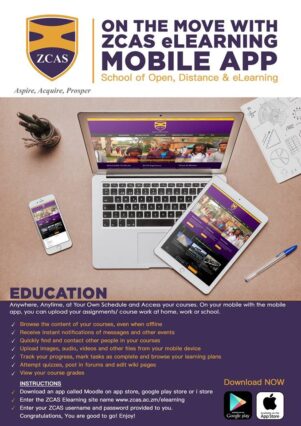
All returning or new students, upon resumption, need to select courses and get familiar with ZCAS University’s digital platforms. Through the portals below, students can register for courses, view fee statements, access learning materials, check examination results, and manage their academic records — all online.
HOW TO ACCESS/LOGIN TO THE ZCAS STUDENT PORTAL
ZCAS University operates multiple portals for different functions. Use the correct one depending on what you need:
- Student Information System (ESIS) — for course registration, fee statements, academic records, and examination results:
https://esis.zcasu.edu.zm/ - E-Learning Portal (Moodle) — for accessing course materials, lecture notes, assignments, and online class resources:
https://moodle.zcasu.edu.zm/ - Professional E-Learning Portal — for professional and part-time students accessing their specific modules:
https://zcas.ac.zm/elearning/
To log in:
- Open your internet browser — Chrome, Firefox, Microsoft Edge, or Safari
- Go to the relevant portal link above depending on your need
- Enter your Student ID and password
- Once logged in, you can perform your academic and administrative activities
Note for new students: Upon admission, you will be assigned a unique Student ID and a temporary password by the university. Use these for your first-time login. The system will prompt you to set a permanent password before proceeding.
HOW TO RECOVER YOUR ZCAS STUDENT PORTAL FORGOTTEN PASSWORD?
- On the login page of the relevant portal, click the “Forgot your password?” link
- Submit your Student ID or registered university email address
- If your details are found in the system, a reset link will be sent to your registered email address with instructions to regain access
- If the self-service reset does not work, contact the ZCAS IT help desk or the Registrar’s office directly for manual assistance
Before contacting support, try clearing your browser cache and cookies, and make sure you are using an updated browser. If your account is locked after multiple failed attempts, the IT help desk can assist with unlocking it.
ZCAS STUDENT PORTAL LOGIN ADDRESS:
- ESIS (Student Information System): https://esis.zcasu.edu.zm/
- E-Learning Portal (Moodle): https://moodle.zcasu.edu.zm/
- Professional E-Learning Portal: https://zcas.ac.zm/elearning/
ZCAS UNIVERSITY, ZCAS OFFICIAL WEBSITE:
- ZCAS Main Website: https://zcasu.edu.zm/
ZCAS REGISTRAR EMAIL ADDRESS:
- ZCAS Registrar Email: information@zcas.edu.zm
ZCAS CONTACT ADDRESS
ZCAS University
Levy Mwanawasa Building Main
Dedan Kimathi Road | P.O. Box 35243, Lusaka, Zambia
Tel: +260 954 153 990 | +260 232 093/5
Further Readings:
Don’t miss out on current updates, kindly like us on Facebook & follow us on Follow @EAfinder OR leave a comment below for further inquiries.
Share this article:
Share on Facebook | Share on Twitter